No more pausing.
Just start talking.
AudioDucker automatically fades your music when you use your mic. Powered by on-device AI for zero-latency control.
Click to watch demo
Works seamlessly with your favorite tools
Who is this for?
Built for people who want to stay in flow without touching a single button.
The Creator
If you use dictation tools like Wispr Flow or superwhisper to speak instead of type, this is for you. AudioDucker ducks your music the moment you activate your mic, so your thoughts stay fluent and uninterrupted.
The Streamer
Designed for power users who keep their mic always on in OBS, Discord, or Zoom. AudioDucker lets you ditch your headphones by intelligently ducking your music only when you are actually talking. Finally, use your speakers without micromanaging audio levels.
Three ways to duck
Instant Focus
Reacts the millisecond your mic activates. Perfect for quick commands and dictation where speed is everything.
Voice Control
Useful for apps that keep your mic always on. Smart enough to know the difference between you speaking and your keyboard clicking.
You're in Control
Setup a global hotkey to toggle ducking on and off instantly. No matter what app you're in, you're always in command.
Instant Detection
AudioDucker sits quietly in your menu bar. The moment you start talking, your music fades. Use the Sensitivity Slider to tune it for noisy environments or quiet studios.
Universal Compatibility
Whether you're using Wispr Flow for dictation, OBS for streaming, or jumping onto a Zoom call, AudioDucker handles the audio management so you don't have to fumble for the pause button.
Privacy First
Notarized by Apple and sandboxed for your security. AI that stays on your Mac. We use advanced on-device processing to detect speech without ever recording or uploading a single byte.
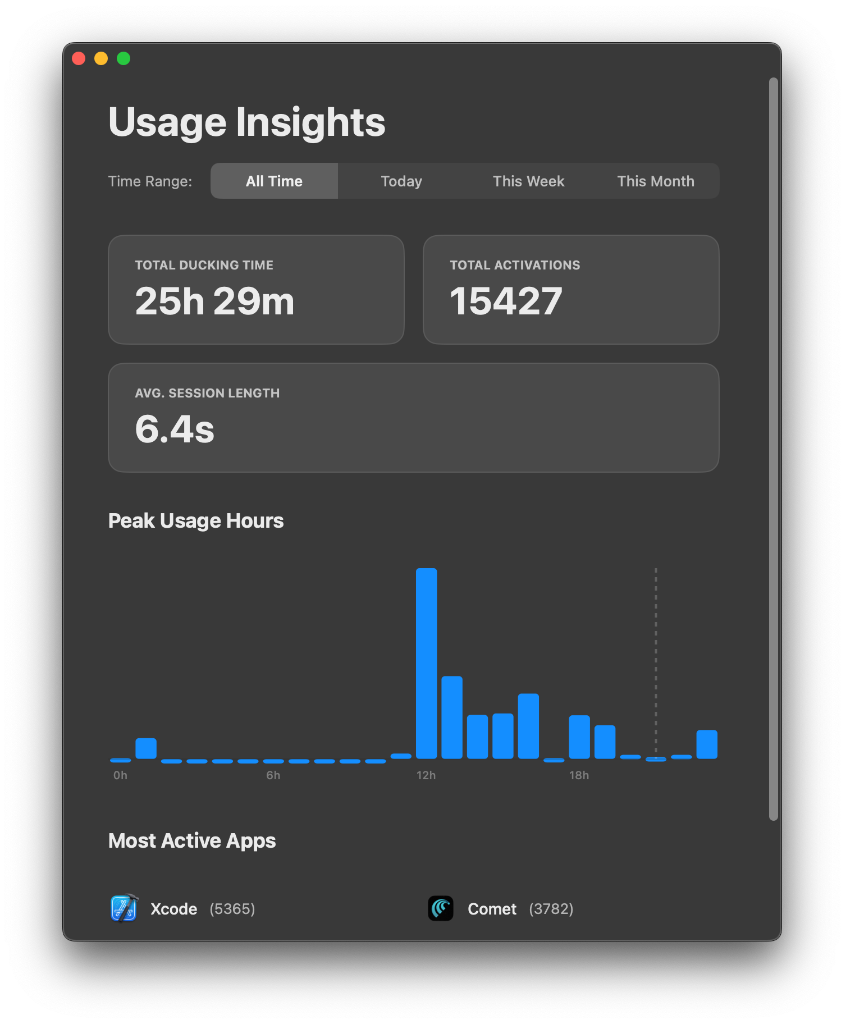
Know your habits
Gain insights into your audio workflow with beautiful, privacy-focused statistics. See your total ducking time, activations, and peak usage hours.
Lightweight by Design
AudioDucker is engineered to run unnoticed in the background. It uses negligible resources, ensuring your CPU power stays dedicated to your game, stream, or heavy workflows.
Frequently Asked Questions
It depends on the mode:
- Standard Mode: Works with everything. The audio ducks whenever your microphone is active or keys are pressed.
- Streaming Mode: Best for apps like OBS, Discord, or Zoom, where your mic is always on. It uses AI to isolate your voice, so it works best with instrumental or melodic music. Songs with heavy vocals (like rap) may be detected as speech.
P.S. My favorite dictation tool is Wispr Flow. Sign up using my link and both of us get one month of Pro free. No affiliation.